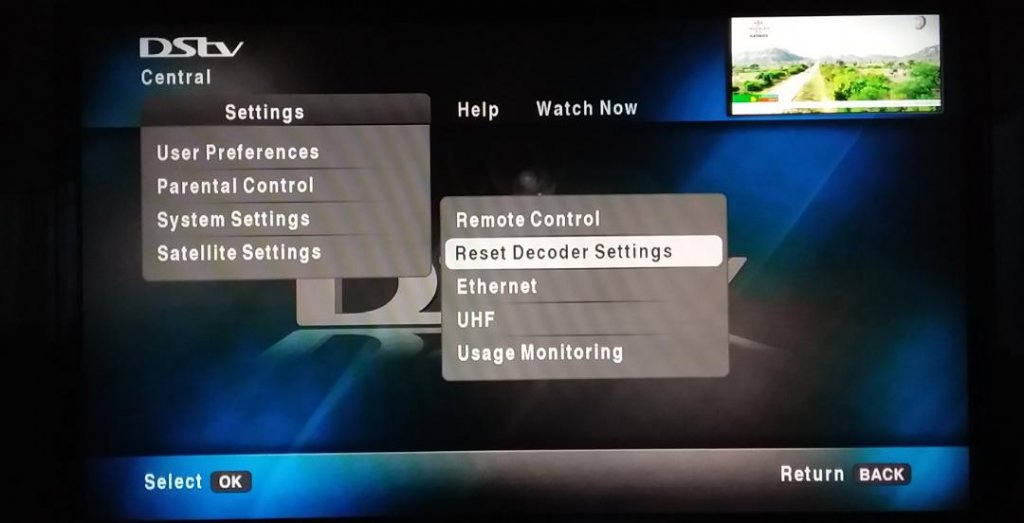
DStv No Signal Error E48-32: The Ultimate Fix Guide
A stable DStv signal delivers unforgettable movie nights and exciting sports events. If you're experiencing DStv signal problems, this comprehensive guide will help you get your signal back.
Table of Contents
Quick Fix Summary: How to Fix DStv No Signal Error
Time needed: 15 minutes
1. Inspect Cable Connections
Ensure all cables between the satellite dish and decoder are securely connected. Check for damage or loose fittings.
2. Reboot the Decoder
Turn off the decoder, unplug it for 1 minute, then plug it back in. This resolves minor software glitches.
3. Check Satellite Dish Alignment
Verify the dish is properly aligned. Tighten any loose bolts and ensure it doesn't move freely.
4. Assess LNB Functionality
Inspect the LNB for damage or rust. Replace if worn out or showing signs of wear.
5. Clear Obstructions
Remove any trees or obstacles blocking the dish's line of sight to the satellite.
6. Run Installation Wizard
Use the DStv menu to access the installation wizard and ensure correct settings.
7. Seek Professional Help
If problems persist, contact accredited DStv installers for expert assistance.
Call for Help: 082 396 9679Why Is My DStv Signal Weak or Lost?
Your DStv signal may be weak due to:
- Misaligned satellite dish - Signal quality drops if alignment is off by even a few degrees
- Faulty LNB (Low Noise Block) - A damaged LNB degrades signal reception
- Loose or damaged cables - Corrosion or frayed coaxial cables cause signal loss
- Bad weather - Heavy rain, storms, and cloud cover disrupt signals
- Incorrect frequency settings - LNB frequencies must match DStv specifications
- Physical obstructions - Trees or buildings blocking the satellite's line of sight
✅ Pro Tip: Check Your Signal Strength
Go to Menu → Settings → Satellite Settings → Signal Strength. Aim for:
- Signal Strength: 85% or higher
- Signal Quality: 75% or higher
DIY Troubleshooting Steps For Fixing DStv No Signal Error
Step 1: Inspect Cable Connections
Check for loose or damaged cables and connectors. Tighten any loose fittings and replace damaged cables. Ensure all cables are connected to the correct ports on the decoder (LNB-in or Unicable-in port).
Step 2: Rebooting the DStv Decoder
Rebooting can solve multiple problems including freezing pictures and decoder errors:
- Unplug the decoder from the power source
- Wait for 10-15 seconds
- Plug it back in
- Wait for the decoder to restart completely
Step 3: Checking Satellite Dish Alignment
Check for signs of misalignment like a tilted or skewed dish. Strong winds or accidental bumps can knock your dish out of position:
- Tighten any loose bolts - your dish should not move freely
- Visually inspect for broken arms or rust
- Gently adjust the dish to face the satellite if needed
- Replace the dish if it's rusted or damaged
Step 4: Assessing LNB Functionality
The LNB (Low-Noise Block Downconverter) picks up the satellite signal:
- Inspect for visible damage like cracks
- Check F-connectors for rust
- Replace if worn out or showing wear
- Ensure proper alignment by tilting it correctly
Step 5: Dealing With Obstructions
Physical obstructions can block your DStv signal:
- Check for overgrown tree branches or nearby structures
- Trim branches or reposition the dish
- Ensure clear line of sight between satellite and dish
⚠️ Safety First!
If your satellite dish is in a high or difficult-to-reach location, don't risk injury. Contact professionals for assistance.
Weather-Related Solutions
Protect Against Adverse Weather Conditions
Heavy rain or storms can interfere with your DStv signal ("rain fade"):
- Consider installing a weatherproof cover for your dish
- Find a strategic spot shielded from harsh elements
- Use a larger satellite dish (90cm or higher) for better reception
- Consider LNB shielding to reduce interference
Temporary Measures During Severe Weather
During severe weather, you might experience temporary signal loss. Be patient - signals usually return when weather clears.
Improving Signal Strength
Using Signal Boosters or Amplifiers
If you live in an area with weak signals, consider signal boosters or amplifiers to strengthen and extend your signal range.
Optimizing Satellite Dish Positioning
Proper positioning is crucial for optimal signal reception:
- Experiment with different angles and locations
- Small adjustments can make a significant difference
- Use the signal strength menu on your decoder for guidance
Regular Maintenance Tips
Regular maintenance prevents future signal problems:
- Check for signs of wear regularly
- Clean the dish surface
- Ensure cables are properly secured and protected
When to Seek Professional DStv Assistance
Sometimes, despite your best efforts, DStv signal issues persist. That's when to call professional DStv installers.
Call Professionals If:
- You've exhausted all DIY options
- You encounter complex signal problems
- Your dish is in a dangerous or hard-to-reach location
- You need equipment replacement or major repairs
Why Choose Home-Tech Installation?
- DStv accredited technicians
- Same-day service available
- Affordable pricing with no hidden costs
- Service warranty on all repairs
Frequently Asked Questions
The E48-32 error indicates a signal problem where the decoder fails to receive a signal from the satellite dish. Check cable connections, dish alignment, and ensure no obstructions are blocking the signal path.
Press Menu → Settings → Satellite Settings → Signal Strength. Aim for Signal Strength above 85% and Signal Quality above 75% for optimal reception.
Yes, heavy rain, storms, and dense clouds can cause "rain fade" which weakens signals. This is usually temporary and clears when weather improves.
LNBs can be damaged by physical impact, severe weather, electrical surges, improper installation, and normal wear over time.
Yes, dense foliage can obstruct the line of sight between your dish and the satellite, causing signal interference or complete loss.
Access signal monitoring via your decoder menu, loosen dish mounting bolts slightly, move the dish in small increments while monitoring signal quality, then tighten bolts once optimal signal is achieved.
Service Coverage Area
Home-Tech Installation provides reliable DStv signal repair services throughout Cape Town and surrounding areas:
Contact us to confirm coverage for your specific location in the Western Cape.
Need Professional DStv Signal Repair in Cape Town?
Our certified technicians will diagnose and fix your DStv signal problems quickly and affordably.
📍 Serving Cape Town and all surrounding areas